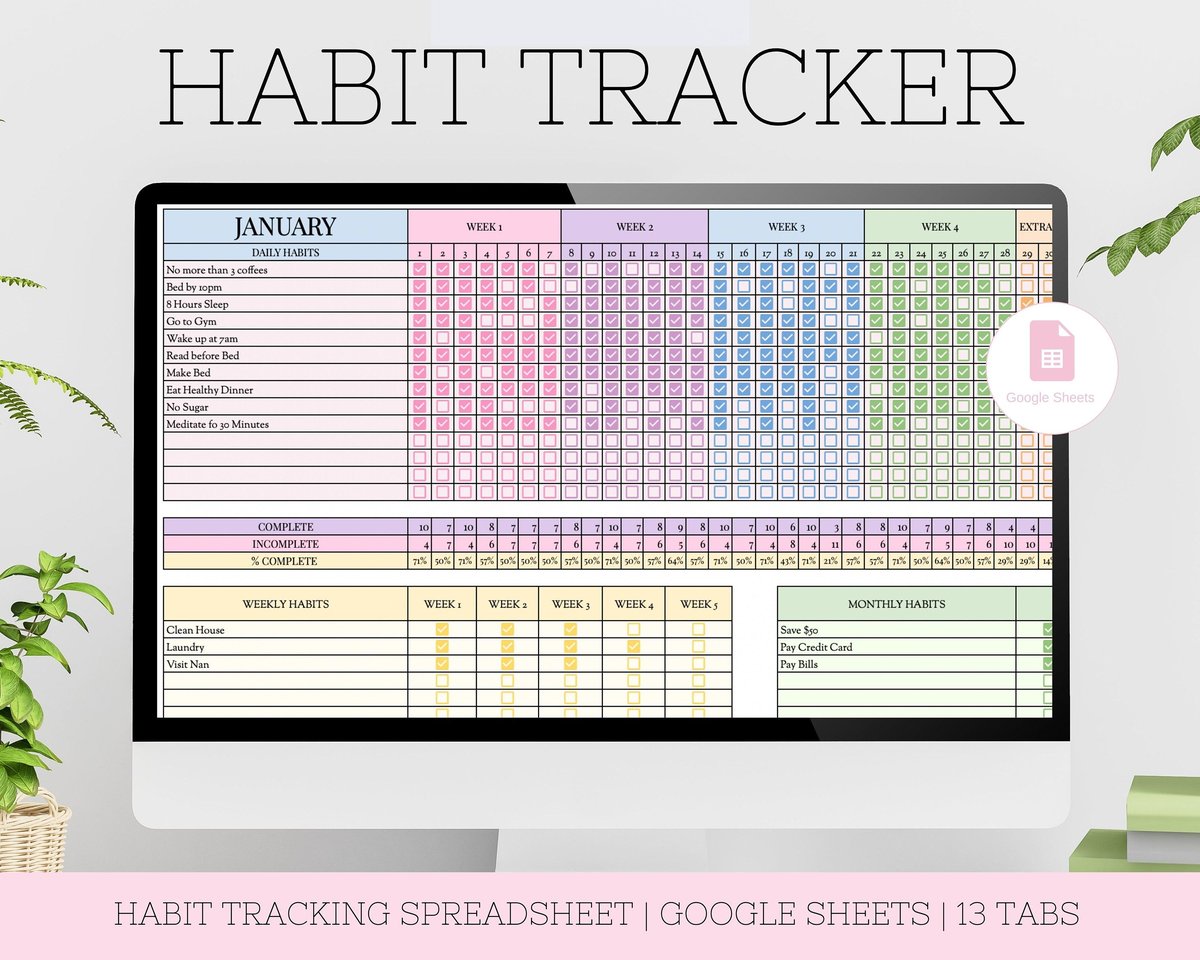
For the bigger picture and full context, make sure you read our main guide on The Best Habit Tracker Spreadsheet Templates for Simple Daily Progress.
Making consistent progress on your goals often feels like wrestling an octopus – a lot of moving parts and not always clear where to grab. That’s where a well-designed habit tracker template for Google Sheets becomes your secret weapon. It’s not just about marking off boxes; it’s about gaining clarity, building momentum, and simplifying your routine into an achievable daily rhythm. Forget expensive apps or complicated systems; the power of a simple, accessible spreadsheet can be transformative for anyone looking to build better habits.
At a Glance: What You’ll Discover
- Why Google Sheets is Ideal: Uncover the core benefits of using Google Sheets for habit tracking, from accessibility to data privacy.
- Essential Features: Understand the must-have elements that make a habit tracker truly effective.
- Choosing Your Template: Explore different types of trackers and decide which best fits your specific goals (e.g., fitness, sobriety, daily routines).
- Build Your Own: Get step-by-step guidance on creating a simple, customized tracker from scratch.
- Level Up Your Tracking: Learn about advanced features and gamification to boost motivation.
- Actionable Advice: Practical tips for consistent tracking and adapting your system over time.
Why Google Sheets is Your Secret Weapon for Habit Tracking
Many people overlook Google Sheets as a powerful tool for personal development, but its simplicity and flexibility make it an outstanding choice for tracking habits. At its heart, a Google Sheets habit tracker is a visual dashboard for your daily commitments, organizing them in a way that’s easy to read and act upon. This isn’t just about checkboxes; it’s about creating a living document that reflects your progress and fuels your motivation.
Consider these significant advantages:
- Unmatched Visibility: A Google Sheet acts like a clear window into your daily life. You get an instant visual representation of your habits, spotting patterns, identifying trends, and immediately seeing areas where you’re excelling or could improve. This clarity significantly increases your awareness of your goals and how you’re pursuing them.
- Consistency Catalyst: The mere act of visually marking off a habit creates a powerful feedback loop. Seeing your progress unfold, especially streaks, provides strong visual cues and reminders that actively encourage consistent task completion. This direct feedback is incredibly effective in helping you establish and maintain new routines.
- Everywhere, Anytime Accessibility: Because Google Sheets lives in the cloud, your tracker is always with you. Whether you’re on your phone, tablet, or computer, you can track and update your habits from anywhere with an internet connection. This ubiquitous access removes friction, making it easier to log progress immediately.
- Positive Reinforcement & Accountability: Watching your progress bars fill or your completion rates rise provides a tangible sense of accomplishment. This positive reinforcement boosts confidence and motivation. Furthermore, the visual “streak” creates a subtle sense of accountability, making you less likely to break a run of successful days.
- Superior Privacy: Unlike many third-party habit tracking apps that may collect your personal data, a Google Sheets tracker keeps your information private within your own Google account. You control your data entirely, offering peace of mind, especially for sensitive personal habits.
The Anatomy of an Effective Google Sheets Tracker
While simplicity is key, an effective habit tracker leverages a few core features to maximize its utility without becoming overly complex. These elements transform a basic grid into a dynamic tool for self-improvement.
Here are the essential components you’ll find in robust Google Sheets habit tracker templates:
- Smart Formulas: The magic behind automated insights. Formulas are used to calculate streaks (e.g., how many days in a row you’ve read), daily or weekly completion rates, or averages across specific habits. For instance, a simple
=COUNTIF(B2:AF2, TRUE)could count completed habits in a month, turning raw data into meaningful progress reports. - Intuitive Tracking System: This is the core interface where you interact with your habits. Typically, it involves columns for each day of the week or month, allowing you to mark habit completion. Checkboxes are a fan-favorite here, offering a quick, satisfying click to log your progress.
- Seamless Customization: Your habits are unique to you, and your tracker should reflect that. A good template allows you to easily input and customize specific habits based on your personal needs and evolving goals. This might involve renaming habits, adding new ones, or even changing tracking frequencies.
- Clear Data Representation: Numbers alone rarely tell the full story. Effective templates incorporate visual elements like conditional formatting (e.g., cells turning green when a habit is completed), mini-charts, or dynamic graphs. These visuals make your habit data and progress immediately understandable, offering a powerful motivational boost.
Choosing Your Blueprint: Different Google Sheets Habit Tracker Templates
One of the greatest strengths of a habit tracker template for Google Sheets is its adaptability. There isn’t a one-size-fits-all solution, and understanding the different types can help you pick or build the best one for your specific journey. Each template type is optimized for different tracking needs, whether it’s a short-term sprint or a long-haul marathon.
Let’s break down some popular categories:
- The Exercise Tracker: For Your Fitness Journey
- Focus: Specifically designed to monitor physical activity, tracking elements like frequency, duration, speed, or distance.
- How it Works: You might input your daily running distance, number of push-ups, or gym attendance. Formulas then calculate progress toward annual fitness goals, perhaps showing “percent-to-goal” calculations for a marathon or weightlifting target. Charts automatically update, giving you a visual of your progress over time.
- Who it’s for: Athletes, fitness enthusiasts, or anyone with clear, quantifiable exercise goals.
- Example: Imagine tracking your weekly long run. You enter the distance each Saturday, and a chart instantly shows if you’re on pace for that half-marathon in six months.
- The Sobriety Tracker: Marking Milestones
- Focus: A powerful tool for individuals on a journey of sobriety, monitoring the duration from a specific start date.
- How it Works: You simply input your sobriety start date. The tracker then automatically calculates and displays your progress in days, weeks, months, and even years using robust formulas. It can often be paired with optional sections for mood tracking or weight changes for a holistic view.
- Who it’s for: Anyone committed to maintaining sobriety and celebrating each milestone.
- Example: Entering January 1st, 2023, as your start date could automatically display “500 days sober” by the time you check it today, offering profound encouragement.
- The Daily Routine Habit Tracker: Your Everyday Companion
- Focus: Designed for maximum ease of use and versatility for tracking 3-5 daily habits.
- How it Works: This template is often optimized for both landscape and portrait orientations for mobile convenience. It includes sections for total tracked days, completed tasks, and yearly progress. You track up to five daily habits with simple checkboxes, which then feed into a success rate percentage and a dynamic progress bar for each habit.
- Who it’s for: Individuals seeking to establish a consistent morning or evening routine, or those starting with just a few key habits.
- Example: Tracking “Drink 8 glasses of water,” “Meditate for 10 min,” and “Read for 20 min” each day, seeing your 75% success rate for meditation visually on the sheet.
- The Monthly Habit Tracker: Task-Specific Oversight
- Focus: Ideal for tracking specific tasks or habits that occur on certain days throughout a month.
- How it Works: This print-friendly template is divided into 12 monthly sections, complete with dates and days of the week. You enter your habits for January, and they automatically copy to subsequent months, accompanied by a visual progress bar for each.
- Who it’s for: People who prefer a month-by-month view, especially for habits that might not be strictly daily (e.g., weekly cleaning tasks, bi-weekly budget review).
- Example: Checking off “Review budget” on the 1st and 15th of each month, and seeing your consistent adherence throughout the year.
- The Annual Habit Tracker: A Year-Round Perspective
- Focus: Provides a comprehensive year-long overview of your habits, often with detailed monthly breakdowns.
- How it Works: This typically features 12 separate sheets, one for each month. Each sheet includes a mini-calendar, automatically updating statistics (completed/incomplete habits), and often a donut chart for a clear visual representation. You can track multiple habits per day with status checkboxes, alongside space for time or notes.
- Who it’s for: Those who want a detailed, holistic view of their habit performance across an entire year, allowing for deep analysis and long-term goal setting.
- Example: Seeing at a glance how your “daily walk” habit performed in April versus August, helping you understand seasonal impacts on your consistency.
If you’re looking for a broader overview of various habit tracking solutions beyond Google Sheets, including apps and other digital tools, you can Explore best habit tracker templates for a comprehensive guide. This resource can help you compare and contrast Google Sheets with other options available.
Mastering Habit Tracking: Principles for Success (Inspired by James Clear)
Having the right tool is only half the battle; knowing how to use it effectively is the other. The principles of effective habit formation, famously articulated by James Clear in “Atomic Habits,” translate beautifully into how you should approach your Google Sheets tracker. These aren’t just theoretical ideas; they are practical guidelines for making your tracker a powerful ally.
- Simplicity Wins Every Time: The human tendency is to overcomplicate, but with habit tracking, complexity often leads to abandonment. The most effective trackers are those that are simple, highly visual, fast to use, and custom-built for your specific needs. Resist the urge to add excessive features or automation initially, as they can introduce friction and overwhelm.
- Practical Insight: A tracker that takes 10 seconds to update daily is infinitely better than one that requires a minute of data entry, no matter how feature-rich the latter might be.
- Focus on Habits, Not Just Goals: While goals are important for direction, sustained change comes from consistent daily habits. Your Google Sheets tracker should emphasize the doing – making habits obvious, attractive, easy, and satisfying. The visual progress on your sheet makes “doing” satisfying and “not doing” obvious.
- Example: Instead of just tracking “Lose 10 pounds” (a goal), track “Walk 30 minutes daily” (a habit). The tracker reinforces the daily action.
- Start Small, Scale Smart: It’s tempting to track every single positive change you want to make, but that often leads to burnout. Begin by tracking just 3-5 key habits. This focused approach avoids overwhelming complexity and allows you to build momentum. You can always add more once the core habits are firmly established.
- Actionable Tip: Don’t build a complex tracker with 20 habits on day one. Start with three, make them visible, and celebrate those small wins before expanding.
Your DIY Playbook: Building a Simple Habit Tracker in Google Sheets
Sometimes, the best template is the one you build yourself. Creating a simple daily habit tracker in Google Sheets from scratch allows you to tailor it exactly to your needs, giving you a deeper understanding of its functionality. It’s easier than you might think, and you don’t need to be a spreadsheet guru.
Here’s a straightforward, step-by-step guide:
- Kick Off with a Blank Canvas: Open Google Sheets and start a new blank spreadsheet. The first thing you should do is name it something clear and descriptive, like “My Daily Habit Tracker” or “2024 Wellness Habits.” This makes it easy to find later.
- Map Out Your Grid: In the first column (Column A), list your habits vertically, starting from Row 2. For instance, “Drink Water,” “Meditate,” “Read 20 Mins.” Then, in Row 1, starting from Column B, list each day of the week (or dates for a month-long tracker). So, Row 1 could be “Mon,” “Tue,” “Wed,” etc.
- Insert the Magic Checkboxes: Select the range of cells where you’ll track your habits (e.g., B2 to H5 for 3 habits over 7 days). Go to “Insert” > “Checkbox.” Instantly, you’ll have clickable boxes for each habit, each day. Clicking them will change their value to
TRUE(checked) orFALSE(unchecked), which is crucial for formulas. - Embrace Visual Simplicity: Over-designing can be distracting. Use soft background colors for rows or columns, or simple gridlines to make your tracker visually appealing yet calming. Keep the font readable. The goal is clarity, not flashiness. Think about what will make you want to look at it daily.
- Add Basic Completion Rate (Optional but Recommended): At the end of each habit row (e.g., in Column I for a weekly tracker), you can add a simple formula to see your consistency. For example, in cell I2, for the habit in row 2, you might use:
=COUNTIF(B2:H2, TRUE)/7. This counts theTRUEcheckboxes (completed days) in the week and divides by the number of days (7), giving you a weekly completion rate percentage. Format the cell as a percentage. - Test on Your Mobile Device: Before you commit, open your new tracker on your phone. Is it easy to tap the checkboxes? Do the rows and columns auto-adjust, or do you need to scroll excessively? Adjust row height or font size as needed to ensure a smooth mobile experience – this is vital for daily, on-the-go updates.
Level Up Your Tracking: Advanced Features and Gamification
Once you’ve mastered the basics, you might crave more from your habit tracker template for Google Sheets. Advanced features and gamification techniques can transform your sheet from a simple logger into a powerful motivator, pushing you to new levels of consistency.
Consider these enhancements:
- Gamification for Added Motivation: Inject some fun into your tracking! Assign custom “reward amounts” (e.g., points, virtual currency, or even dollar values representing self-care treats) for each completed habit. Your tracker can then tally daily, weekly, and monthly “earnings.” Seeing these totals grow provides a powerful sense of achievement and makes tracking feel like a game you want to win.
- Scenario: If “Meditate” is worth 5 points and “Workout” is worth 10, completing both earns you 15 points towards a weekly goal of 100 points, which might unlock a “movie night” reward.
- Smart Category Management: As your list of habits grows, organization becomes crucial. Group your habits into custom categories like “Creative,” “Career,” “Fitness,” “Wellness,” or “Learning.” Using conditional formatting, you can even color-code these categories, making your tracker visually distinct and easy to navigate. This helps you quickly assess progress across different life areas.
- Multi-Period Tracking for Comprehensive Views: Some advanced templates support tracking across multiple timeframes simultaneously – daily, weekly, and monthly habits all in one dashboard. They can even handle a large volume, tracking up to 450 habits or tasks in some robust iterations. This integrated view helps connect immediate actions to broader goals.
- Long-Term Progress Over Years: For truly ambitious individuals, a tracker can log progress year-to-date and even across multiple years (e.g., 2023-2033). This is usually achieved by duplicating tabs for new periods and having a clear mechanism to archive or clear previous progress while maintaining historical data. It offers an incredible perspective on your growth journey.
Quick Answers to Common Google Sheets Habit Tracking Questions
Here are direct answers to some frequently asked questions about using Google Sheets for habit tracking:
Why choose Google Sheets over a dedicated habit tracking app?
Google Sheets offers superior customization, data privacy (your data stays with you), and universal accessibility from any device. It’s often more flexible and budget-friendly than premium apps.
How often should I update my habit tracker?
Daily is ideal. Logging your habits immediately after completion reinforces the behavior and prevents forgetting. Consistency in logging is as important as consistency in performing the habit.
What if I miss a day or break a streak?
Don’t get discouraged! The goal is consistency, not perfection. Mark the day as incomplete and focus on getting back on track the next day. The visual tracker helps you recover quickly and build resilience.
Can I share my Google Sheets habit tracker with others?
Yes, absolutely. Google Sheets has robust sharing features. You can share your tracker with friends, accountability partners, or even a coach, granting them view-only or editing access as needed.
Is it hard to set up conditional formatting or charts in Google Sheets?
No, it’s quite straightforward. Google Sheets has intuitive menus for both. For conditional formatting, you select your range and apply rules (e.g., “if cell is TRUE, make green”). For charts, select your data and “Insert” > “Chart” to choose from various templates.
What’s the best way to handle evolving habits or goals?
Your tracker should be a living document. Simply update your habit list directly in the sheet. Delete old habits, add new ones, or adjust the wording. The beauty of Google Sheets is its adaptability.
Your Next Step: Simple & Strategic Habit Tracking
Implementing a habit tracker template for Google Sheets doesn’t require a grand gesture; it requires a consistent, strategic approach. Start simple. Whether you download a well-regarded template or build your own from scratch, the immediate action is to make it your own. Customize the habits to reflect your true aspirations, and then commit to the daily ritual of tracking.
Remember, the goal isn’t to create a perfect spreadsheet, but to gain clarity on your daily habits and build unstoppable momentum. Continuously adjust your tracker as your life and goals evolve. Make that small, consistent effort, and watch how those little checkboxes add up to big life changes.

Through this website, I share simple, science-backed tips for low impact health whether it's gentle fitness routines, stress-free wellness habits, or eco-friendly lifestyle changes. My goal is to make healthy living more accessible, sustainable, and kind to both our bodies.
- Healthy Eating Habits to Fuel Your Body for Lasting Vitality - May 9, 2026
- Inspirational Health Related Sayings for Your Best Self - May 8, 2026
- Healthy Mind Quotes for Cultivating Peace and Mental Strength - May 7, 2026