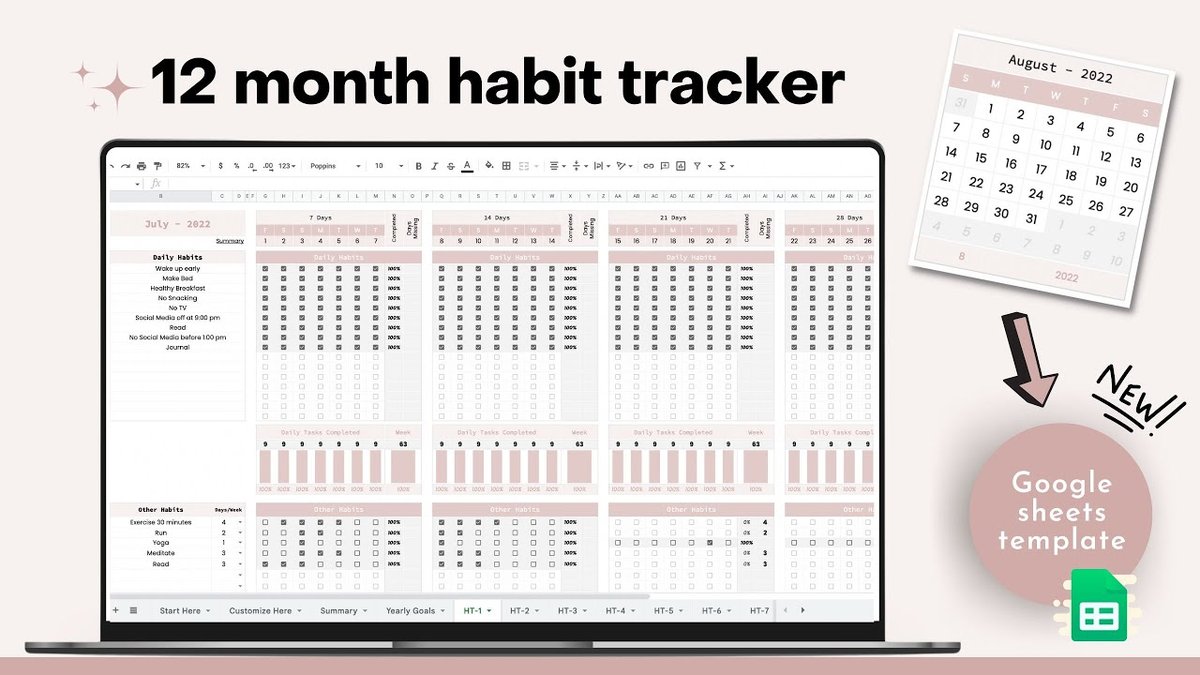
When it comes to solidifying new behaviors, a habit tracker Google Sheets spreadsheet offers a surprisingly powerful, private, and customizable tool. Forget complicated apps or flimsy paper logs – building lasting habits often comes down to clear, consistent tracking you control, right from your browser. Whether you’re aiming to drink more water, stick to a fitness routine, or finally get that novel written, Google Sheets provides the perfect sandbox to design a system that genuinely works for you.
At a Glance: What You’ll Master Here
- Understand the “Why”: Discover why Google Sheets excels as a habit tracking solution, offering visibility, consistency, and unparalleled privacy.
- Simplicity Wins: Learn why a DIY, minimalist approach often outperforms feature-rich alternatives.
- Build Your Own: Get step-by-step instructions to create a personalized, mobile-friendly daily habit tracker.
- Avoid Common Pitfalls: Identify and sidestep mistakes that lead to abandoned trackers and lost motivation.
- Explore Template Power: See how existing Google Sheets templates (for exercise, sobriety, daily routines, and more) can jumpstart your journey.
- Know When to Upgrade: Understand when your simple tracker might need a professional boost.
Why Google Sheets is Your Secret Weapon for Habit Formation
In a world brimming with apps vying for your attention, the unassuming Google Sheet stands out as an exceptional ally for habit tracking. It’s not just a digital ledger; it’s a dynamic canvas that transforms abstract goals into visible, actionable progress.
Think of it as your personal, highly adaptable dashboard. Each time you mark a habit complete, you’re not just ticking a box; you’re reinforcing a positive loop. This visual reinforcement is crucial for building momentum and confidence, directly supporting principles of consistent, incremental improvement as popularized by experts like James Clear. You’re not just tracking, you’re seeing your dedication unfold.
The Undeniable Advantages:
- Crystal-Clear Visibility: Google Sheets lays out your habits, patterns, and streaks in a visual format. Seeing your progress (or identifying where you’ve slipped) makes you profoundly more aware of your routines.
- Anytime, Anywhere Accessibility: With an internet connection, your tracker is available on your phone, tablet, or computer. No need to remember to carry a notebook or be tied to a single device.
- Unmatched Privacy: Unlike many third-party apps that might collect your data, your Google Sheet remains entirely yours, stored securely within your Google account.
- Boosted Motivation & Accountability: Streaks are powerful motivators. A visual reminder of your consistent effort provides positive reinforcement and creates a quiet sense of accountability to yourself.
- Customization Without Coding: Tailor every aspect – from the habits you track to the colors and formulas – without needing advanced technical skills.
For those looking for a jumpstart, a wide range of pre-made templates exist, from basic daily trackers to specialized options for fitness or sobriety. For a broader overview of excellent resources, you might explore this guide on the Best Habit Tracker Templates.
Template Showcase: Practical Google Sheets Habit Trackers in Action
While building your own is empowering, sometimes a robust template provides the perfect starting point. These examples demonstrate the versatility of Google Sheets, showing how specific needs can be met with pre-built logic.
1. The Exercise Tracker: Beyond Just Showing Up
An exercise tracker in Google Sheets doesn’t just record if you worked out; it can quantify your progress towards specific fitness goals.
- How it works: Imagine a sheet where you input your daily or weekly running distance. Formulas automatically sum your total distance for the month or year, then calculate your percentage towards an annual goal (e.g., “Run 500 miles this year”).
- The benefit: This template shifts focus from mere activity to measurable achievement, making your fitness journey quantifiable and your goals feel more attainable. Charts dynamically update, giving you an instant visual of your percent-to-goal.
2. The Sobriety Tracker: A Milestone Marker
For a journey as significant as sobriety, a simple yet powerful tracker can be a daily anchor.
- How it works: You enter your sobriety start date into a single cell. Using
TODAY()and date difference formulas, the sheet immediately calculates and displays your exact days, months, and even years sober. - The benefit: This provides consistent, undeniable proof of progress, offering a powerful sense of accomplishment. It can be a vital component of a broader wellness sheet, perhaps combined with mood or gratitude tracking.
3. The Daily Routine Tracker: Your Day, Your Rules
This category of templates focuses on making daily habit tracking simple and adaptable.
- How it works: Typically, these sheets offer space for 3-5 habits, with daily checkboxes. They automatically tally your ‘days completed’ and calculate success rate percentages. Dynamic progress bars visually fill up as you consistently hit your marks.
- The benefit: User-friendly and often designed for both landscape and portrait printing, these trackers ensure your daily routines become second nature without feeling like a burden.
4. The Monthly Habit Tracker: Seasonal Sticking Power
For habits that benefit from a month-by-month focus, these templates are ideal.
- How it works: Divided into 12 sections, one for each month, these trackers let you list habits once (e.g., in January), and they often auto-populate for subsequent months. Each month features dates, days of the week, and a progress bar.
- The benefit: They offer a structured, print-friendly layout for visualizing monthly consistency and identifying seasonal patterns in your habits.
5. The Annual Habit Tracker: The Big Picture View
For those who prefer a holistic, year-long perspective across many habits, the annual tracker is indispensable.
- How it works: This typically involves 12 separate sheets within one Google file, each dedicated to a month. Each monthly sheet features a mini-calendar, checkbox columns for daily tracking, and automatically updating counts of completed/incomplete habits. Many include a donut chart for a quick visual summary of monthly stats.
- The benefit: Ideal for managing multiple tasks and seeing your commitment to various goals evolve over an entire year, providing both granular daily detail and overarching yearly trends.
Accessing Any Template: To use any Google Sheets template you find online, simply go toFile > Make a Copy. This saves a personal, editable version directly to your Google Drive.
Build Your Own: The “Simplicity Wins” Habit Tracker Playbook
The stark truth about habit tracking is this: the most effective tracker isn’t the most feature-rich, but the one you actually use consistently. Overly complex templates or apps often fail because they introduce friction, becoming a chore rather than a tool. Your best bet? A simple, visual, custom-built Google Sheet designed for daily ease.
Why DIY is the Ultimate Power Move
- Total Control: You dictate every habit, every visual element, and every metric of success.
- No Bloat: Skip features you don’t need, eliminating potential sources of confusion or frustration.
- True Learning: Discover what genuinely motivates you and what truly matters in your habit-tracking journey.
Step-by-Step: Crafting Your Minimalist Daily Tracker
- Start Fresh: Open Google Sheets and create a new blank spreadsheet. Name it something inspiring, like “My Daily Wins.”
- Define Your Habits: In Column A, starting from Row 2, list 3-5 habits you want to track. Example: “Drink 8 Glasses Water”, “Meditate 10 Mins”, “Read 20 Pages”.
- Set Up Your Days: In Row 1, starting from Column B, list the days of the week or dates for the current month.
- Option 1 (Days of Week): “Mon”, “Tue”, “Wed”, “Thu”, “Fri”, “Sat”, “Sun”. Repeat for upcoming weeks.
- Option 2 (Dates): “1”, “2”, “3”, … “31”. This is often better for a monthly view.
- Insert Checkboxes:
- Select the range where your habits meet your days (e.g., from B2 across to the last day, and down to the last habit).
- Go to
Insert > Checkbox. Now you have clickable boxes for each habit, each day.
- Add Simple Visual Progress (Optional but Recommended):
- At the end of each habit row (e.g., in Column I if you have 7 days), add a formula to show your weekly completion rate.
- For a habit in row 2, tracking Monday-Sunday in columns B-H, use:
=COUNTIF(B2:H2, TRUE)/7. Format as a percentage. - This instantly shows you “57%” or “100%” for the week, providing powerful positive reinforcement.
- Customize Visually (Keep it Calming):
- Select your entire tracking area. Apply a soft fill color to the cells (e.g., a light blue or green).
- Add simple, thin gridlines.
- Use a clean, readable font (like Roboto or Open Sans).
- Pro Tip: Avoid bold, neon colors, or busy backgrounds. The goal is a calming, inviting space, not a distracting one. Test print if you plan to use it offline sometimes.
- Ensure Mobile-Friendliness: Open your new tracker on your phone.
- Are the checkboxes easy to tap?
- Is the font readable without excessive zooming?
- Adjust column width or row height as needed.
Your simple tracker is now ready. The power comes from using it consistently, not from its complexity.
Dodging the Tracker Traps: Mistakes to Avoid
Even the simplest habit tracker can falter if you fall into common pitfalls. These are the “anti-patterns” that turn a helpful tool into another abandoned project.
- The “Too Many Habits” Trap: Trying to track 10+ new habits at once is a recipe for overwhelm. Start with 3-5 key habits. Once those are consistent, then gradually add more. Focus on building a strong foundation.
- The “Over-Automation” Overload: While formulas are great, don’t try to automate every single thing right away. If your tracker requires complex scripts or constantly breaks, it becomes a barrier, not an aid. Simplicity over sophistication.
- The “Streak Punishment” Paradox: If you miss a day, just leave the box unchecked. Don’t delete columns or try to “fix” it. The point isn’t perfection; it’s consistent effort. Showing up is the goal, not an unbroken chain. A missed day is a data point, not a failure.
- The “Complexity Test” Fail: Can you explain how to use your tracker to a friend in less than 60 seconds? If not, it’s too complex. Cut features until it passes the test.
- The “Dreaded Feature” Dilemma: Regularly review your tracker. Is there any part of it you dread filling out? Any column or habit that feels like a chore? Cut it out. Your tracker should feel supportive, not burdensome. Design it for your “worst day,” not just your most motivated one.
The Daily Tracking Reality Check (A Mini Tool)
Before adding a habit to your daily tracker, ask yourself these three critical questions:
- Do I genuinely want to notice this every single day? If the answer is “sometimes,” it might be a weekly habit.
- Does tracking it daily feel motivating, or like a chore? If it feels like a chore, you’re building resistance.
- Is daily the right rhythm, or would weekly feel better? Many habits (e.g., “journaling for an hour”) are more realistically tracked weekly than daily.
Be ruthless in removing habits from your daily list if they don’t spark genuine interest or provide clear value when tracked daily.
When to Upgrade: From Simple to Sophisticated
Your simple DIY Google Sheets tracker will carry you a long way. But there might come a point where you genuinely need more. This is when you consider upgrading to a more professional, feature-rich template or even a dedicated app.
Look for an Upgrade When…
- You clearly understand which specific advanced features you need. Don’t upgrade for “more features”; upgrade for specific solutions. For example, “I need automated weekly summaries across categories” or “I want to track monetary rewards for completed habits.”
- Your simple tracker feels genuinely limiting. You’ve maxed out its capabilities and have a clear vision for what additional functionality would tangibly improve your tracking experience.
- You want gamification or advanced analytics. Some templates, like the comprehensive one from youexec.com, offer features like assigning monetary rewards to habits, tracking daily/weekly/monthly completion across 450 habits, and year-to-date views with gamified elements. These are built to apply principles like James Clear’s “make it attractive” and “make it satisfying” by showing earned rewards and progress bars.
An advanced template can provide: - Gamified Incentives: Assign custom “reward” amounts to completed habits (e.g., $1 for meditation, $5 for a workout).
- Multi-Category Tracking: Organize habits into customizable categories (e.g., Health, Learning, Finance).
- Timeframe Flexibility: Track across months, or get a full year-to-date overview.
- High Capacity: Support for a large number of habits if your lifestyle demands it.
- Built-in Analytics: Dashboards and charts that automatically summarize your performance.
Remember, the goal isn’t to have the most complex tracker, but the most effective one. Upgrade strategically, based on proven need, not just perceived coolness.
Your Path to Lasting Habits: A Quick-Start Guide
Building lasting habits with a habit tracker Google Sheets system isn’t about perfection; it’s about consistency and clarity. Here’s a streamlined plan to get you started today:
- Start Simple (Always): Create your own minimalist tracker in Google Sheets. Column A for 3-5 core habits, Row 1 for dates. Insert checkboxes. Add a simple
=COUNTIF()formula for weekly percentage completion. - Commit to Daily Use: Make tracking a habit in itself. Set a reminder to open your sheet and check off habits at the end of each day.
- Observe, Don’t Judge: Use the visual feedback to understand your patterns. Where are you consistent? Where do you slip? This is information, not failure.
- Refine Relentlessly: Every few weeks, review your habits and your tracker. Are the habits still relevant? Is the tracker easy to use? Remove anything that feels like a burden.
- Scale Smartly: Only when your simple tracker feels genuinely insufficient, consider exploring more advanced templates or adding a few more habits.
Your Google Sheet is a powerful, flexible tool awaiting your command. Embrace its simplicity, customize it to your unique needs, and watch as those small daily actions compound into remarkable, lasting change.

Through this website, I share simple, science-backed tips for low impact health whether it's gentle fitness routines, stress-free wellness habits, or eco-friendly lifestyle changes. My goal is to make healthy living more accessible, sustainable, and kind to both our bodies.
- Healthy Eating Habits to Fuel Your Body for Lasting Vitality - May 9, 2026
- Inspirational Health Related Sayings for Your Best Self - May 8, 2026
- Healthy Mind Quotes for Cultivating Peace and Mental Strength - May 7, 2026