We all start the new year—or any Monday, for that matter—with the best intentions. We promise ourselves we’ll hit the gym daily, read more, drink enough water, or finally master that new skill. But somewhere between the morning alarm and our bustling lives, those good intentions often lose their way. What if a simple, accessible tool could cut through the noise, help you visualize your progress, and genuinely reinforce those small, consistent actions that lead to big changes?
Enter the habit tracker spreadsheet. Forget fancy apps that bombard you with notifications and complex dashboards. Sometimes, the most powerful tools are the simplest, and a well-designed spreadsheet can be your secret weapon for building lasting habits, celebrating tiny wins, and making daily progress effortlessly.
At a Glance: Your Roadmap to Habit Success with Spreadsheets
- What It Is: An interactive spreadsheet that visually tracks your daily habits, marking what you have accomplished.
- Why Spreadsheets? Offers unparalleled visibility, consistency, accessibility, privacy, and positive reinforcement without the clutter of many apps.
- Key Features: Customizable habit lists, daily checkboxes, automated calculations for streaks and completion rates, and visual progress bars or charts.
- Top Templates: From daily routine trackers to annual overviews, there’s a spreadsheet design for every goal, whether it’s fitness, sobriety, or general well-being.
- DIY or Template? You can easily build your own simple tracker in minutes or start with a robust pre-made template.
- Success Principles: Keep it simple, start with 3-5 habits, prioritize consistency over perfection, and design for calm focus.
Why Your Daily Progress Needs a Habit Tracker Spreadsheet
Think of your habits as the invisible architecture of your life. The good ones build you up, the less-than-ideal ones hold you back. The challenge isn’t usually knowing what to do, but doing it consistently. This is where a habit tracker spreadsheet shines. Unlike a static schedule that tells you what you should do, a habit tracker actively records what you have done, turning abstract goals into tangible proof of effort.
It’s a digital scoreboard for your personal growth, providing instant feedback and a visual record of your journey. Imagine seeing a growing chain of “X” marks or green checkboxes for “Drank 8 glasses of water” or “Read for 30 minutes.” That visual evidence isn’t just data; it’s a powerful psychological motivator.
Here’s why opting for a spreadsheet over a dedicated app often makes more sense for many people:
- Unrivaled Visibility: A spreadsheet lays out your habits and your adherence to them over days, weeks, or months in a single, glanceable view. You instantly see patterns, identify areas where you’re excelling, and pinpoint where you might be slipping. This elevated awareness of your goals is a game-changer.
- Fosters Consistency: Building a new habit is less about willpower and more about establishing a routine. A visible tracker acts as a gentle, persistent reminder, prompting you to complete your tasks and helping to solidify those desired behaviors.
- Everywhere You Are: Whether you’re on your phone during your commute, your laptop at your desk, or a tablet on the couch, your spreadsheet is just a click away. As long as you have an internet connection, accessibility is never an issue with cloud-based options like Google Sheets. This seamless access means you can Track habits with Google Sheets from virtually anywhere.
- Positive Reinforcement: Each checkbox or marked day provides a mini-victory, building momentum and confidence. Seeing your “streak” grow is incredibly motivating, fostering a sense of accomplishment and accountability that’s often missing when habits are left unchecked.
- Enhanced Privacy: Many dedicated apps collect user data, but a personal spreadsheet resides entirely within your chosen cloud storage (like Google Drive) or on your device. You maintain full control over your personal data, ensuring your self-improvement journey remains private.
- Supports Habit Formation Principles: This approach aligns perfectly with frameworks like James Clear’s “Atomic Habits,” which emphasizes making habit formation obvious, attractive, easy, and satisfying. A visual tracker makes your progress obvious and satisfying, encouraging you to “not break the chain.”
What Makes a Habit Tracker Spreadsheet Truly Useful? Essential Features
While simplicity is key, certain features elevate a basic sheet into a powerful personal growth tool. When you’re looking for a template or crafting your own, keep these in mind:
- Smart Formulas: These are the hidden engines of your tracker. Formulas can automatically calculate your current streak, your overall completion rate (e.g., 85% success for “daily meditation”), or your average consistency over time. They transform raw data into meaningful insights.
- Intuitive Tracking Mechanisms: The most common and effective method is simple checkboxes. A quick click or tap to mark a habit as “done” for the day keeps the process frictionless. Conditional formatting can then change the cell color to green (for done) or red (for missed) for immediate visual feedback.
- Personalized Customization: Your habits are unique to you, so your tracker should be too. The ability to easily input your specific habits (e.g., “Write 500 words,” “Call Mom,” “No social media after 9 PM”) is paramount.
- Clear Data Representation: Beyond just checkboxes, visual elements help you interpret your progress at a glance. This could include:
- Conditional Formatting: Automatically changes cell colors based on completion status (e.g., green for done, red for incomplete, grey for weekend).
- Progress Bars: Visually show your completion percentage for a specific habit or overall daily habits.
- Charts or Graphs: A simple bar graph showing monthly completion rates or a pie chart illustrating overall success can be incredibly motivating.
Finding Your Perfect Match: Recommended Habit Tracker Spreadsheet Templates
Not all habit trackers are created equal. The “best” one for you depends entirely on your specific goals and how you like to see your progress. Here’s a breakdown of popular and highly effective types, many of which you can easily replicate or find as ready-to-use templates. To access any Google Sheets template you find online, simply click “File” then “Make a Copy” to save it to your own Google Drive.
1. The Focused Daily Routine Habit Tracker
This is your go-to for honing in on a small, manageable set of daily habits. It’s designed for maximum simplicity and quick updates.
- Function: Ideal for tracking 3-5 core daily habits you want to solidify. Its straightforward design encourages consistent engagement without overwhelming you.
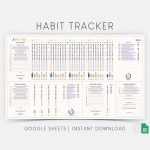
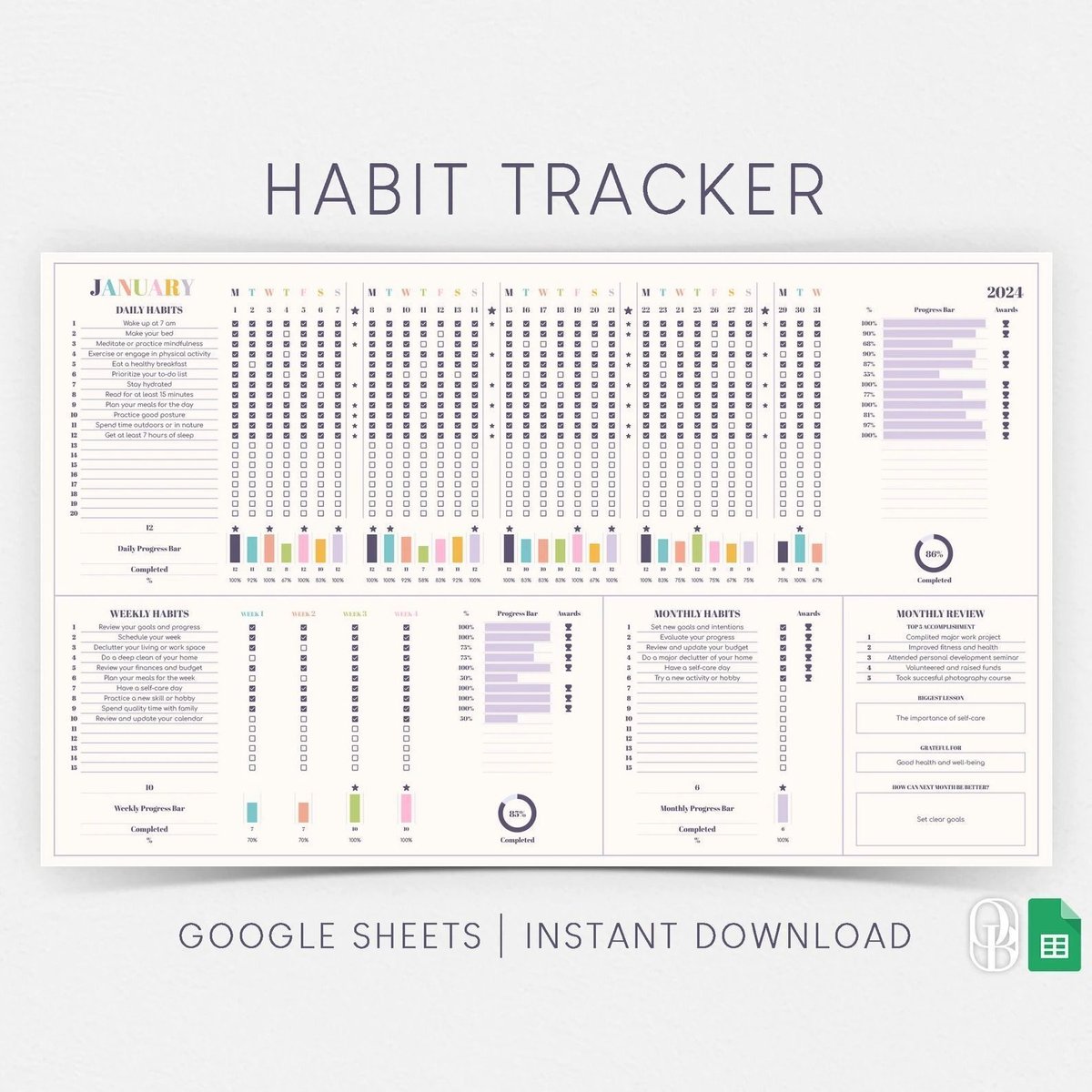
- Mechanism: Typically structured with two main sections. The first provides a quick overview, showing the total days tracked, days tasks completed, and a simple annual progress bar. The second section lists your chosen habits vertically, with daily checkboxes extending horizontally across the days or weeks. Each habit might have its own success rate counter and a dynamic progress bar.
- Why it works: Its adaptive interface (good for both landscape and portrait views on mobile) and minimal design make daily check-ins effortless. It removes friction, which is crucial for new habit formation. If you’re ready to jump in, you can Get your habit tracker template designed specifically for daily routines.
2. The Comprehensive Monthly Habit Tracker
For those who prefer a monthly view, perhaps to print out and stick on a physical board, this template is fantastic.
- Function: Excellent for tracking tasks that occur on specific days within a month, or for getting a digestible monthly overview of your daily habits. It’s also great for “print-friendly” users.
- Structure: Often features 12 distinct sections, one for each month. Each section includes rows for the month, date, and day of the week, along with columns for your habits and progress bars.
- Mechanism: You typically input your habits once in the January section, and they automatically populate across the subsequent months, saving you repetitive setup time.
- Why it works: The monthly segmentation makes it less daunting than a full annual view, providing a fresh start and a clear goal post every 30 days.
3. The Big-Picture Annual Habit Tracker
When you need a year-long bird’s-eye view, especially for tracking numerous tasks or long-term objectives, this template delivers.
- Function: Provides a holistic overview of your entire year, making it perfect for tracking multiple habits or visualizing long-term consistency trends.
- Structure: Usually comprises 12 separate sheets (one for each month) within a single workbook. Each monthly sheet might feature a mini-calendar, columns for automatically updated totals of completed/uncompleted habits, and a visual element like a donut chart to summarize monthly progress. Space is also typically allocated for habit names, times (if relevant), dates, and checkbox status.
- Why it works: Seeing your progress unfold across 365 days can be profoundly motivating, helping you identify seasonal patterns or sustained periods of high performance. It’s fantastic for reviewing your year and setting goals for the next.
4. The Goal-Oriented Exercise Tracker
Beyond just checking boxes, this tracker helps you quantify and visualize physical achievements.
- Function: Specifically designed to monitor exercise frequency, intensity (e.g., distance), and progress towards annual fitness goals.
- Mechanism: You input specific metrics like distance covered or workout duration for each session, along with the month. Formulas (like
SUMand division) then automatically update charts and calculate the percentage of your annual goal achieved. - Why it works: It turns abstract fitness aspirations into concrete, measurable data, providing a clear path and quantifiable rewards for your efforts.
5. The Milestones-Focused Sobriety Tracker
For sensitive and significant life changes, a tracker tailored to sobriety can offer crucial support.
- Function: Helps individuals track their duration of sobriety from a specific start date, offering a clear visual of their journey.
- Mechanism: You input your “start date,” and the tracker automatically calculates and displays the number of days, months, and even years of sobriety using functions like
TODAY(). This information is often presented in a single, encouraging sentence. - Why it works: It provides consistent positive reinforcement, celebrating every day, month, and year of progress. It can also be powerfully combined with mood or weight trackers to illustrate the long-term positive effects of sobriety.
Crafting Your Own: Building a Simple Daily Habit Tracker in Google Sheets
Sometimes, the best tool is one you build yourself. The process of creating your own basic habit tracker in Google Sheets is surprisingly simple and gives you total control.
Step-by-Step Guide:
- Start a Fresh Sheet: Open Google Sheets and create a new blank spreadsheet. Name it something clear, like “My Daily Habits.”
- Set Up Your Layout:
- In Column A, starting from Row 2, list each of the daily habits you want to track (e.g., “Drink 8 Glasses Water,” “Meditate 10 Mins,” “Read 20 Pages”).
- In Row 1, starting from Column B, list the days of the week (Mon, Tue, Wed, etc.) or specific dates for the month. Extend this as far as you need.
- Insert Checkboxes:
- Select the range of cells where you want to mark your habits (e.g., from B2 all the way to H and down to your last habit).
- Go to the “Insert” menu at the top.
- Select “Checkbox.” You’ll see little interactive boxes appear.
- Add Visual Flair (Optional but Recommended):
- Soft Colors: Select a soothing background color for your sheet (Format > Fill color). Avoid harsh, bright colors that can be distracting.
- Simple Gridlines: Keep the default gridlines or slightly grey them out for a clean look (View > Show > Gridlines can be toggled).
- Highlighting: Use conditional formatting to make checked boxes stand out.
- Select your checkbox range.
- Go to Format > Conditional formatting.
- Under “Format rules,” choose “Custom formula is” and enter
=B2=TRUE(adjustB2to the top-left cell of your selected range). - Set the formatting style to a light green fill color.
- Create a Simple Progress Bar (Optional):
- At the end of each habit row (e.g., in Column I), add a formula to show your completion rate for the week.
- For the first habit, if your checkboxes are in B2:H2 (7 days), the formula would be:
=COUNTIF(B2:H2, TRUE)/7. - Format this cell as a percentage. You can also use conditional formatting for a visual progress bar (Format > Conditional formatting > Color scale or Data bar).
- Ensure Mobile-Friendliness: Open your new spreadsheet in the Google Sheets app on your phone. Are the checkboxes large enough to tap easily? Do you need to adjust row heights or font sizes? A good mobile experience ensures you’ll actually use it.
Beyond Checkboxes: Principles for Habit Tracking Success
A spreadsheet is a tool, but its effectiveness hinges on how you use it and the mindset you bring. Here are principles that transform a simple tracker into a powerful catalyst for change:
- Simplicity is Your North Star: The biggest trap in habit tracking is over-complication. A tracker that’s too complex, too automated, or too cluttered quickly becomes a chore and is abandoned. Start with the absolute minimum you need. A minimalist design often yields the best results.
- Build Your Own (or Personalize a Template): While templates are great starting points, taking ownership of your tracker by building it or extensively customizing a template gives you full control. You decide what success looks like, what metrics matter, and how it feels to use. This personal connection boosts adherence.
- Start Small, Stay Small (Initially): Don’t overwhelm yourself. James Clear, author of “Atomic Habits,” advocates for small, incremental changes. Begin by tracking just 3-5 core daily habits. Once you’ve consistently tracked those for a week or two, then—and only then—consider adding more.
- Avoid Over-Automation (at First): While formulas are powerful, resist the urge to automate every single metric from day one. Focus on the core functionality: tracking and visual feedback. Complex automation can introduce bugs or slow down your sheet, frustrating you more than helping.
- Design for Calm Focus: Use soft, muted colors and simple gridlines. Your tracker should be a calming space, not a visually noisy dashboard. A tranquil design encourages mindful engagement.
- Prioritize Mobile-Friendliness: Most of us check our phones multiple times a day. Ensure your checkboxes are large enough to tap quickly on a mobile device. The easier it is to update, the more likely you’ll stick with it.
- Select Clear, Daily Habits: Track habits that are unambiguous and truly daily. “Drink water” is clear; “Be healthier” is not. For weekly or monthly habits (e.g., “Review finances,” “Meal prep”), consider a separate, dedicated tracker.
- Embrace the Blanks (or the “Don’t Break the Chain” Mentality): If you miss a day, don’t despair. Leave the box blank or mark it as missed. The goal isn’t perfection; it’s consistency over time. The occasional missed day is part of life. Just pick up where you left off. As Jerry Seinfeld famously said about his joke-writing habit, the goal is to “not break the chain” of X’s on his calendar.
- Upgrade Strategically, Not Automatically: A simple spreadsheet can handle a remarkable amount. Only consider upgrading to a more professional tool or app if your simple tracker genuinely can’t meet a specific, advanced need (e.g., integration with other tools, highly complex analytics). For most personal habit tracking, the simplicity of a spreadsheet is unmatched.
- Learn from the Masters: The concept of habit tracking is ancient. Benjamin Franklin, for instance, used a chart to track 13 virtues daily. Modern experts like Charles Duhigg (author of “The Power of Habit”) highlight “keystone habits”—small habits that, once established, inadvertently lead to other positive changes (e.g., regular exercise often leads to healthier eating). Whether you use Google Sheets or choose to Download Excel habit tracker template, these principles remain the same.
What Habits Should You Track? Ideas to Get You Started
The beauty of a habit tracker spreadsheet is its versatility. You can track anything that matters to you. Here are some common and impactful habit ideas across different life areas:
Health & Wellness:
- Drink X Glasses of Water
- Exercise 30 Minutes
- Walk 10,000 Steps
- Eat 5 Servings of Fruits/Veggies
- Meditate 10 Minutes
- Floss Every Day
- Get 7-8 Hours of Sleep
- No Sugar/Processed Food
- Take Daily Medication
- Spend 10 Minutes Outdoors
- Practice Deep Breathing
- Stretch for 15 Minutes
Personal Development & Productivity: - Read 20 Pages
- Journal for 10 Minutes
- Learn a New Skill for 30 Minutes
- Work on Side Project for 1 Hour
- Plan Your Day in Advance
- Review Goals
- Practice Gratitude
- No Social Media After X PM
- Limit Screen Time
- Declutter for 15 Minutes
Financial Habits: - Track All Spending
- No “Impulse Buys”
- Pack Lunch (vs. Eat Out)
- Review Budget
- Save X Amount
Ready-Made Templates vs. DIY: Making the Right Choice for You
You have two main paths to a habit tracker spreadsheet: starting with a pre-built template or designing your own from scratch.
Using Pre-Made Templates:
- Pros: Instant gratification, often professionally designed, includes advanced formulas and visualizations you might not know how to build, saves time. Many excellent free options are available.
- Cons: Might include features you don’t need (leading to clutter), may not perfectly align with your aesthetic preferences, less sense of ownership, can be harder to troubleshoot if you don’t understand the underlying formulas.
- How to Access: For Google Sheets, usually you’ll find a link to the template. Click it, then go to “File” > “Make a Copy” to save it to your Google Drive. For Excel, it’s typically a direct download.
Building Your Own:
- Pros: Total customization, complete understanding of every formula and design choice, a strong sense of ownership and personal connection, can be as simple or complex as you need.
- Cons: Requires basic spreadsheet knowledge (or a willingness to learn), takes more time initially, may not look as polished without design expertise.
Our Recommendation: If you’re new to habit tracking or spreadsheets, start with a simple, well-regarded template (like one of the daily or monthly trackers mentioned above). Use it for a few weeks. As you understand what you like and dislike, you’ll be better equipped to either customize that template heavily or build your perfect tracker from the ground up.
Beyond the Basics: When to Consider Advanced Tools (and When Not To)
A habit tracker spreadsheet is incredibly powerful, but it’s important to understand its sweet spot.
When a Spreadsheet Excels (and is Often Superior):
- For Visual Clarity: Nothing beats a spreadsheet for laying out a month or year of progress in a single, editable, visual canvas.
- For Customization: Spreadsheets allow you to tailor every single aspect, from the habit names to the colors, formulas, and data displays.
- For Privacy: Your data stays with you.
- For Cost-Effectiveness: Google Sheets is free, and most Excel users already have the software.
- For Focus: It’s just a sheet; there are no push notifications, social feeds, or distracting “gamification” elements unless you choose to build them.
When a Dedicated App Might Be a Better Fit: - Automated Reminders: If you absolutely need consistent push notifications to remind you to do a habit.
- Deep Integrations: If you want your habit tracker to integrate directly with other apps (e.g., Apple Health, calendar, smart home devices).
- Complex Analytics: Some apps offer highly sophisticated data analysis, projections, and AI-driven insights, although these can often be replicated with advanced spreadsheet skills.
- Social Accountability: If you thrive on sharing your progress with a community or friends directly within an app.
For the vast majority of people focused on personal growth and simple, consistent habit building, a well-designed habit tracker spreadsheet offers everything you need without the bloat, cost, or data privacy concerns of many apps. It’s a testament to the idea that often, the simplest solution is the most effective.
Your Next Step: Start Small, Track Smart, Grow Daily
Building new habits and shedding old ones isn’t about grand gestures; it’s about the relentless accumulation of small, consistent choices. Your habit tracker spreadsheet isn’t just a ledger of your actions; it’s a testament to your commitment, a visual celebration of every tiny step forward, and a gentle coach guiding you toward the person you aspire to be.
Don’t overthink it. Choose 2-3 habits you want to focus on this week. Pick one of the template types discussed, or spend 15 minutes setting up your own simple sheet. Remember the principles: keep it minimal, make it mobile-friendly, and celebrate every single checkmark. The magic isn’t in the spreadsheet itself, but in the deliberate action and the awareness it fosters. Start today, and watch your daily progress transform into a lifetime of positive change.

Through this website, I share simple, science-backed tips for low impact health whether it's gentle fitness routines, stress-free wellness habits, or eco-friendly lifestyle changes. My goal is to make healthy living more accessible, sustainable, and kind to both our bodies.
- The Best Habit Tracker Spreadsheet Templates for Simple Daily Progress - March 20, 2026
- Habit Tracking Apps Help You Achieve Your Personal Goals - March 19, 2026
- Atomic Habits Book Reveals How Tiny Changes Transform Your Life - March 18, 2026