Struggling to find that perfect habit tracker excel template that genuinely fits your unique goals and daily rhythm? The truth is, most off-the-shelf templates, while helpful, often fall short of capturing the nuances of your personal development journey. What if you could design a bespoke spreadsheet, complete with custom formulas, visualizations, and automated insights, just by describing your vision in plain English?
Welcome to the era where artificial intelligence isn’t just generating text; it’s crafting sophisticated Excel templates tailored to your exact specifications. This isn’t about adapting to a rigid system; it’s about the system adapting to you.
At a Glance: Crafting Your AI-Powered Habit Tracker
- AI as Your Spreadsheet Co-Pilot: Learn how natural language prompts empower AI to build complex
habit tracker excel templates from scratch. - Beyond Basic Checkboxes: Discover how AI integrates advanced tracking components like streak counters, success rates, and category summaries.
- Visualizing Your Progress: Understand how AI automates progress bars, heatmaps, and achievement badges for instant motivation.
- Automated Insights: See how conditional formatting, data validation, and custom graphs are generated to elevate your tracking experience.
- Real-World Examples: Explore diverse templates for fitness, mood, goals, and productivity, all generated by AI’s intelligence.
- Prompting for Perfection: Get actionable tips on how to effectively communicate your ideal habit tracker to an AI tool.
The Frustration with Generic Templates (And Why AI Changes Everything)
You’ve probably been there: downloading a “universal” habit tracker excel template, only to spend hours tweaking column headers, adjusting formulas, or wrestling with conditional formatting that never quite behaves. Generic templates are built for the lowest common denominator, often lacking the specific metrics, visual cues, or motivational elements crucial for your unique habits—whether it’s tracking specific workout reps, daily meditation minutes, or a complex reading goal. This friction can quickly derail your motivation, turning a tool meant for progress into another chore.
This is precisely where AI-powered platforms like Sourcetable step in. By merging the robust functionality of Excel with the natural language processing of tools like ChatGPT, they bypass the manual setup entirely. Instead of struggling with cell references or VBA scripts, you simply describe the spreadsheet you need, and the AI generates it. This capability transforms the creation process from a technical challenge into a conversational request, putting truly customized solutions within reach, instantly.
Deconstructing the AI-Powered Habit Tracker Excel Template
An AI-generated habit tracker excel template isn’t just a prettier spreadsheet; it’s a functionally intelligent one. It integrates specific components and features that would typically require significant manual effort and Excel expertise.
Core Components AI Generates for Precision Tracking
Think beyond simple check-off boxes. AI can imbue your template with smart tracking logic from the get-go:
- Daily Check-off Boxes: The fundamental building block, easily generated across chosen date ranges.
- Weekly Progress Summaries: Automatically consolidate daily efforts, showing how consistently you’ve engaged with each habit over a seven-day cycle.
- Habit Streaks: A powerful motivator. AI can embed formulas to calculate consecutive days of completion, for example,
IF(Today's Completion=1,Previous Streak+1,0)will extend your streak if today’s habit is completed. Another formula likeCOUNT(IF(Range='Yes',1,0))can tally total completions within a given period. - Success Rate Metrics: See your percentage completion for each habit or category. This immediate feedback helps you gauge effectiveness and identify areas needing more focus.
- Customizable Habit Categories: AI understands hierarchies. You can request sections for “Morning Routine,” “Work Habits,” or “Wellness Goals,” and it will structure the template accordingly.
Visual Magic at Your Fingertips
Visual feedback is paramount for sustained motivation. AI excels at embedding dynamic visual elements:
- Progress Bars: Instantly show how close you are to completing a weekly goal or reaching a milestone. If you track water intake, a progress bar can visually fill up as you log more glasses.
- Heatmaps: Color-coded cells that reveal patterns at a glance. Imagine seeing a deep green for consistent meditation days and lighter shades for missed ones, helping you spot trends over weeks or months.
- Achievement Badges: While not always a literal “badge” image, AI can implement conditional formatting to highlight milestones, such as completing a 30-day streak with a special color or symbol.
Beyond Basic Tracking: Automated Features for Deeper Insights
The true power of an AI-generated template lies in its automated capabilities, saving you from tedious setup and ensuring data integrity:
- Data Validation: Ensure only specific inputs (e.g., “Yes,” “No,” a number range) are allowed, preventing errors and maintaining clean data.
- Conditional Formatting: This goes beyond heatmaps. AI can set rules like changing a cell’s color if a habit is missed, highlighting an active streak, or signaling when a weekly goal has been met.
- Progress Graphs: Automatically generated charts—line graphs for trends, bar charts for weekly summaries, or pie charts for habit category breakdown—provide immediate visual analysis of your journey without any manual chart creation.
Track Anything, Tailored to You
The versatility of AI allows for a vast array of tracked parameters, adapting to virtually any personal development goal:
- Exercise Routines: Log sets, reps, weight, and even calculate your one-rep max (1RM) with AI-generated formulas like
1RM = w(1 + r/30). - Meditation Sessions: Track duration, frequency, and consistency.
- Water Intake: Monitor daily consumption against a target.
- Sleep Patterns: Record hours slept, sleep quality scores, and identify weekly averages.
- Reading Goals: Track pages read, books completed, or time spent reading daily.
- Productivity Metrics: Log time spent on specific tasks, track Pomodoro intervals, and summarize productive hours.
Real-World AI-Generated Template Examples
To truly appreciate the power of AI in crafting habit trackers, consider these practical, AI-generated template types, each designed to serve a specific purpose:
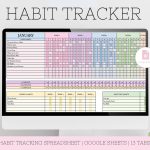
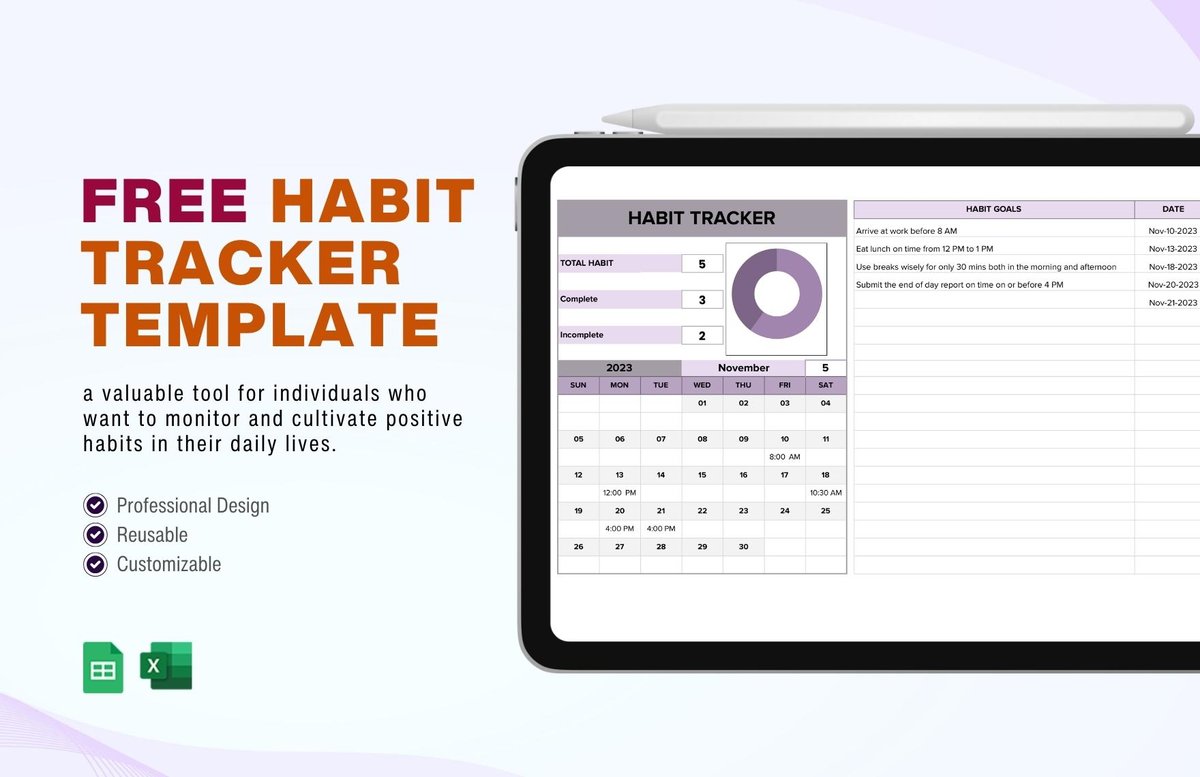
- Daily Habit Tracker: This foundational template can feature customizable rows for your habits (e.g., “Meditate,” “Read,” “Exercise”), columns for each day of the month, automated completion rates, and conditional formatting that visually reinforces streaks. You might ask for it to highlight weekends differently.
- Fitness Progress Tracker: Imagine a spreadsheet that not only tracks your workout routines but also automatically calculates repetitions, weight progression, and even your weekly volume totals. The AI can integrate formulas for metrics like the one-rep max (
1RM = w(1 + r/30)) instantly. This provides a deep dive into your physical progress without manual calculation. - Mood and Health Monitor: A template designed to monitor daily mood scores, sleep quality, and wellness activities. The AI can generate color-coded cells to reflect mood levels, automated weekly averages for sleep, and even identify correlations between activities and your overall well-being.
- Goal Achievement Template: For those with bigger aspirations, this template sets and tracks monthly goals with progress indicators. AI can include milestones, automated percentage completion, and deadline monitoring. For instance, if you’re saving for a down payment, it could track contributions, percentage towards goal, and days remaining.
- Productivity Time Log: Beyond just listing tasks, this template records time spent on various activities, includes references to Pomodoro timing, and provides automatic daily or weekly productivity summaries with custom category filtering. This helps you understand where your time truly goes.
The versatility demonstrated by these examples highlights how AI can move beyond general templates to create highly specialized tools. For a broader overview of various pre-made habit tracker options, including those you might adapt or use for inspiration, you can refer to our guide on the Best Habit Tracker Spreadsheets.
Crafting Your AI Prompt: From Idea to Excel Template
The key to unlocking AI’s potential is learning to communicate your needs effectively. Think of it like describing your dream car to an engineer—the more details you provide, the closer the final product will be to your vision.
Step 1: Define Your Habits & Goals Clearly
Start with the basics: what habits do you want to track, and why? Be specific about the action and the frequency.
- Poor Prompt: “Make a habit tracker.” (Too vague)
- Better Prompt: “Create a daily habit tracker for my morning routine: meditate 10 minutes, drink 1 liter of water, and read 30 pages. I also want to track my evening walk (30 mins) daily.”
Step 2: Envision Your Ideal Features and Calculations
Next, consider the specific spreadsheet functionalities and calculations you want to see.
- Adding Detail: “For each habit, I need a daily checkbox. I want a weekly summary for each habit showing completion percentage. Please include a streak counter for ‘Meditate’ and ‘Evening Walk’.”
Step 3: Specify Automation and Visual Elements
Now, think about how you want the data to be presented and what automatic functions would be helpful.
- Adding Visuals & Automation: “Add a progress bar that fills up as I drink more water towards my 1-liter goal. Use conditional formatting to highlight active streaks in green and missed days in red. Include a simple line graph showing my weekly reading progress.”
Step 4: Refine Your Request (Iterate)
AI isn’t a mind-reader, and your first prompt might not yield the perfect template. Be prepared to iterate. If the first output isn’t quite right, tell the AI what you want to change.
- Refinement Example: “The current template is good, but can you add a separate section for monthly goals? Also, instead of a line graph for reading, can we have a bar chart that compares my actual pages read to my 30-page goal each day?”
By breaking down your request into these components, you empower the AI to generate a sophisticated, genuinely usefulhabit tracker excel templatethat aligns perfectly with your personal development objectives.
The Unrivaled Benefits of an AI-Designed Habit Tracker
Leveraging AI to create your habit tracker isn’t just a convenience; it’s a strategic advantage in your personal growth journey. The benefits compound, making consistent tracking more accessible, insightful, and motivating.
- Instant Customization for Deeper Insights: Unlike generic templates, AI builds a tracker tailored to your exact habits, goals, and desired metrics from the ground up. This means you’re tracking exactly what matters to you, leading to more relevant data and deeper personal insights. This eliminates the “make-do” feeling and replaces it with a “made-for-me” experience.
- Enhanced Discipline & Accountability on Autopilot: A custom template with built-in streaks, progress bars, and success rates acts as a powerful motivator. Seeing your progress visually, specifically how you defined it, cultivates discipline and reinforces accountability to yourself. This instant feedback loop helps you identify challenges early and celebrate victories, keeping you on track.
- Superior Data Privacy and Control: When you generate an Excel or Google Sheets template, your personal data remains within your chosen spreadsheet environment. This offers a level of data privacy and control often unmatched by third-party apps, where your information might reside on external servers. You own the data and its storage.
- Dynamic Visualizations for Unmatched Motivation: AI-generated visuals—heatmaps, progress bars, and custom graphs—transform raw data into compelling narratives. These aren’t static images; they dynamically update with your input, making it easier to see patterns, celebrate consistent efforts, and quickly pinpoint areas needing improvement. This visual reinforcement is incredibly powerful in boosting confidence.
- Unlocking Consistency with Tailored Cues: An intuitive, custom layout designed by AI reduces cognitive load. You don’t have to decipher complex formulas or navigate confusing sections. This ease of use encourages consistent daily logging, turning tracking into a seamless part of your routine. Visual cues, tailored to your preferences, act as gentle reminders to complete tasks.
- Effortless Accessibility and Collaboration (for Google Sheets): While AI generates the template, you can often specify the format (e.g., Excel or Google Sheets). If generated for Google Sheets, your custom tracker becomes accessible from any device with an internet connection, allowing for tracking on the go or even sharing with an accountability partner.
- Positive Reinforcement on Autopilot: Witnessing your custom progress bars fill, streak counters grow, and success rates climb provides immediate positive reinforcement. This intrinsic motivation is critical for habit formation, as research indicates it takes approximately 66 days to develop a habit. An AI-designed tracker helps you navigate those crucial first weeks with consistent, encouraging feedback.
What Makes an AI-Generated Habit Tracker Truly Good?
The effectiveness of any tool lies in its design. When AI crafts your habit tracker, certain qualities are amplified, leading to a superior tracking experience.
- Intuitive Design, Right from the Start: AI, when prompted well, prioritizes ease of use. It can arrange elements logically, creating a clean layout without overwhelming complexity. This means less time figuring out the spreadsheet and more time focusing on your habits.
- Unlimited Customization Potential: This is where AI truly shines. A good AI-generated template isn’t just customizable at creation; it’s designed to be easily adaptable post-generation. You can continuously refine it with further AI prompts or manual tweaks as your goals evolve.
- Clear Demarcations & Smart Layouts: AI can structure the template with clearly defined sections for habit names, tracking frequency, and progress logging. For instance, it might automatically group daily habits from weekly ones or use distinct formatting for each month.
- Automated Visual Aids for Instant Clarity: Color-coding, dynamic progress bars, and custom charts are not just aesthetically pleasing; they display information at a glance, allowing you to interpret your progress quickly and efficiently. AI ensures these are integrated smoothly.
- Seamless Accessibility for Your Data: Whether it’s an Excel file saved locally or a Google Sheet accessible via browser, a good AI-generated template ensures your tracking data is available whenever and wherever you need it, encouraging consistent engagement.
- Consistent Tracking, Minimal Cognitive Load: An AI-designed layout can maintain consistency across various sections, reducing the mental effort required to log your habits. This minimizes friction and helps cement tracking as part of your routine.
- Logical Navigability for Effortless Review: The sections within the tracker are well-defined and easy to navigate, making it simple to review past progress, identify trends, and plan future adjustments without getting lost in a maze of data.
Quick Answers: Your AI Habit Tracker Questions Solved
Can AI really create complex formulas for me?
Absolutely. AI can generate sophisticated formulas for things like calculating your one-rep max (1RM = w(1 + r/30)), tracking sobriety days (TODAY()-B2 for days, INT(days/365) for years), or even calculating weekly volume totals based on your input. Just describe the calculation you need in your prompt.
Is it hard to learn how to prompt AI for this?
Not at all. The beauty of these AI platforms is their natural language processing. You describe your desired spreadsheet and its features in plain English, just as you would explain it to a human assistant. The more specific you are, the better the result, but it doesn’t require any coding or specialized prompting language.
What if I don’t like the first version the AI generates?
That’s perfectly normal! AI tools are iterative. If the first output isn’t exactly what you envisioned, simply tell the AI what you’d like to change or refine. You can ask it to adjust layouts, add new features, modify formulas, or change visual elements. It’s a conversational process.
How does an AI-generated tracker compare to pre-made templates?
AI-generated trackers offer unparalleled customization. While pre-made templates are convenient, they often require significant manual tweaking to fit specific needs. AI creates a bespoke solution from scratch based on your description, offering the ideal balance of instant creation and perfect fit, often with complex features that would be difficult to add manually to a pre-made template.
Is data privacy a concern when using AI tools for habit tracking?
When you use an AI to generate an Excel template, the data processing happens during the creation phase. Once the template is generated and downloaded, your actual habit tracking data is typically stored locally on your device or in your personal cloud storage (like Google Drive for Google Sheets). You retain full control over your ongoing data, which generally offers better privacy than many third-party habit tracking apps. Always check the privacy policy of the specific AI platform you use for generation.
How long does it typically take to build a habit with a tracker?
Research indicates that it takes approximately 66 days to develop a habit. A good habit tracker, whether AI-generated or not, provides the consistent visual feedback and accountability needed to push through this critical period, making the process more conscious and effective.
Your Personal AI Habit Tracking Playbook: Instant Implementation
The power to create your ultimate habit tracker excel template is now at your fingertips, thanks to AI. This isn’t just about streamlining a tedious task; it’s about investing in a highly personalized tool that genuinely supports your personal growth.
Instead of hunting for a template that’s “good enough,” embrace the ability to articulate your exact needs. Start simple: try prompting an AI tool with something like, “Create a daily habit tracker for my morning routine: meditate 10 minutes, drink 1 liter of water, and read 30 pages. Include checkboxes, a weekly progress summary, and a streak counter for meditation.”
From there, experiment. Add conditional formatting, request specific graphs, or ask for more complex calculations. The more you use it, the better you’ll become at prompting, and the more perfectly aligned your habit tracker will be with your journey. This approach not only saves time but also delivers a level of customization and functional depth that empowers you to truly take control of your daily progress.

Through this website, I share simple, science-backed tips for low impact health whether it's gentle fitness routines, stress-free wellness habits, or eco-friendly lifestyle changes. My goal is to make healthy living more accessible, sustainable, and kind to both our bodies.
- Habit Tracker Template Printable Helps You Build Lasting Good Habits - March 24, 2026
- Design Your Own Habit Tracker Excel Template Instantly With AI - March 23, 2026
- Habit Tracker Template for Google Sheets Simplifies Your Routine - March 22, 2026